


CUBO Printers
PrimeID is the exclusive distributor of CUBO ID card printers in the United States, offering a new generation of compact, high-performance printing solutions. Designed for simplicity, speed, and modern workflows, CUBO printers deliver vibrant color output, reliable performance, and user-friendly operation. Whether for schools, businesses, or membership programs, CUBO printers provide an efficient and affordable way to produce professional-quality ID cards with minimal setup and maximum convenience.


CUBO 3S Simplex High Speed ID Card Printer bundlewith 3-Year Warranty
CUBO 3D Duplex High Speed ID Card Printer with 3-Year Warranty


CUBO 2S Simplex ID Card Printer with 3-Year Warranty
CUBO 2D Duplex ID Card Printer with 3-Year Warranty
CUBO 1 Simplex Hand-Fed ID Card Printer kit with 1-Year Warranty
Genuine CUBO ribbons for vibrant, reliable, and consistent card printing
See Our Complete CUBO Ribbon Line
Explore the full range of CUBO printer ribbons available exclusively through PrimeID in the United States. Designed for consistent performance and exceptional print quality, these genuine CUBO ribbons deliver vibrant colors, sharp detail, and reliable results with every card. Whether used for full-color or monochrome printing, CUBO ribbons ensure your printer operates at peak performance for organizations of all sizes.


CUBO 1, 2 & 3 series YMCFKO full-color and UV panel ribbon with cleaning roller & 200 cards/roll
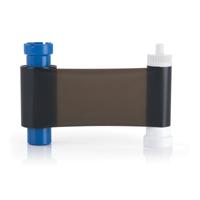
CUBO 1, 2 & 3 series K resin black ribbon with cleaning roller and 1200 cards/roll


CUBO 1 Simplex Hand-Fed ID Card Printer kit with 1-Year Warranty
The CUBO 1 is a compact, hand_fed dye_sublimation printer designed for small organizations or low_volume ID card issuance. It delivers edge_to_edge color printing at 300_dpi (mono up to 1200_dpi), producing up to 150 full_color cards per hour or up to 720 monochrome cards per hour. Includes printer, ribbon, and cards
Everything you need to know about CUBO printers, features, encoding, and support
CUBO ID Card Printers: Frequently Asked Questions
CUBO ID card printers combine compact design with powerful performance, making them an ideal choice for modern ID card programs. As the exclusive distributor of CUBO printers in the United States, PrimeID provides expert guidance, genuine supplies, and dedicated support. This FAQ section answers the most common questions about setup, printing capabilities, encoding options, maintenance, and warranty—helping you get the most out of your CUBO printer.
What are CUBO ID card printers?
CUBO printers are a new generation of compact and user-friendly ID card printers developed by IDP. They are designed for organizations that need reliable, high-quality card printing in a modern and space-saving form factor.
What makes CUBO printers different from traditional ID card printers?
CUBO printers focus on simplicity, compact design, and ease of use. They feature a modern cube-style footprint, intuitive operation, and are ideal for environments where space, design, and efficiency matter.
Which CUBO printer model should I choose?
- CUBO 1: Entry-level, single-sided printing for low-volume use
- CUBO 2: Enhanced performance with optional dual-sided capabilities
- CUBO 3: Advanced features, higher throughput, and expanded encoding options
The right choice depends on your card volume, security requirements, and workflow.
Can CUBO printers print double-sided ID cards?
Yes. Depending on the model, dual-sided printing is available either as a standard feature or optional upgrade. This is ideal for adding barcodes, terms, or additional information on the back of the card.
What types of cards can I print with a CUBO printer?
CUBO printers support standard CR80 PVC cards, as well as magnetic stripe cards and various smart cards (depending on configuration). They are suitable for employee badges, student IDs, membership cards, and access control cards.
Do CUBO printers support card encoding?
Yes. Select CUBO models support magnetic stripe, contact, and contactless encoding options such as MIFARE® and DESFire®. Encoding capabilities depend on the specific configuration selected.
What ribbons are used with CUBO printers?
CUBO printers use dedicated IDP ribbon cartridges, including:
- YMCKO (full-color front, black text, overlay)
- YMCKOK (dual-sided printing)
- Monochrome ribbons (black, white, gold, silver)
Using genuine CUBO ribbons ensures optimal print quality and printer longevity.
How easy is it to set up a CUBO printer?
CUBO printers are designed for quick and simple setup. Most users can install the printer, load the ribbon, and start printing within minutes using the provided drivers and software.
What software works with CUBO printers?
CUBO printers are compatible with professional ID card software such as CardExchange® Producer, as well as other industry-standard card design applications. This allows for easy design, database integration, and batch printing.
How do I maintain a CUBO printer?
Routine maintenance includes:
- Regular cleaning using official cleaning kits
- Keeping the printer dust-free
- Replacing ribbons and rollers as needed
Following recommended maintenance schedules ensures consistent print quality and extends the life of the printer.
How many cards can I print with a ribbon?
Typical ribbon yields are:
- YMCKO: up to ~300 cards
- YMCKOK: up to ~200 cards
- Monochrome: up to ~1,000 cards
Actual yield depends on card design and coverage.
Where can I buy CUBO printers and supplies in the United States?
CUBO printers, ribbons, and accessories are exclusively available in the United States through PrimeID. Purchasing through PrimeID ensures you receive genuine products, full support, and access to certified solutions.
Are CUBO printers suitable for high-volume printing?
CUBO printers are designed for small to mid-sized programs. For higher volume or advanced security needs, solutions can be scaled with multiple units or alternative industrial printers.
Why choose PrimeID for CUBO printers?
As the exclusive U.S. distributor, PrimeID offers:
- Direct access to the full CUBO lineup
- Expert product guidance
- Integration with CardExchange® solutions
- Reliable supply of ribbons and parts
- Dedicated customer support
What encoding options are available for CUBO printers?
CUBO printers can be configured with a range of encoding options depending on the model, including magnetic stripe encoding, contact smart card encoding, and contactless encoding such as MIFARE® and DESFire®. These options make CUBO printers suitable for access control, secure identification, and multi-application card programs.
Which CUBO printers support magnetic stripe encoding?
All CUBO ID card printers — including the CUBO 1, CUBO 2, and CUBO 3 — offer the option for magnetic stripe encoding. This feature can be configured at the time of purchase and, in many cases, added later as an upgrade.
Magnetic encoding allows you to store data on cards for applications such as access control, time and attendance, membership tracking, and more. For more advanced encoding requirements, higher-tier models like the CUBO 2 and CUBO 3 may offer additional flexibility and performance.
Can encoding modules be added later to a CUBO printer?
Yes. Many CUBO printer models support field upgrades, allowing encoding modules to be added after the initial purchase. This provides flexibility to start with basic printing and expand into advanced card technologies as your program evolves.
What warranty comes with CUBO printers?
CUBO printers typically include a manufacturer warranty that covers parts and labor for a defined period. Warranty terms may vary by model and configuration, but all printers purchased through PrimeID are backed by official support and service within the United States.
How do I get warranty support for my CUBO printer in the U.S.?
As the exclusive U.S. distributor, PrimeID handles all warranty-related support for CUBO printers. This includes troubleshooting, repair coordination, and replacement when applicable. Customers can contact PrimeID directly for fast and reliable service.

Prefer Not to Handle Printing Yourself?
Skip the hassle of managing your own card printer and let our expert team do the work for you. We provide high-quality, fully customized ID card printing with fast turnaround times. From single cards to large batches, our secure process delivers vibrant colors, sharp details, and long-lasting results ready to use straight out of the box.